
Article ID: 2027029 Last updated: 21 January 2026
A VAT Code Type called ‘Reverse Charge EU/RoW Service Purchase’ is available for businesses required to report reverse charge purchases of services from the EU and rest of the world.
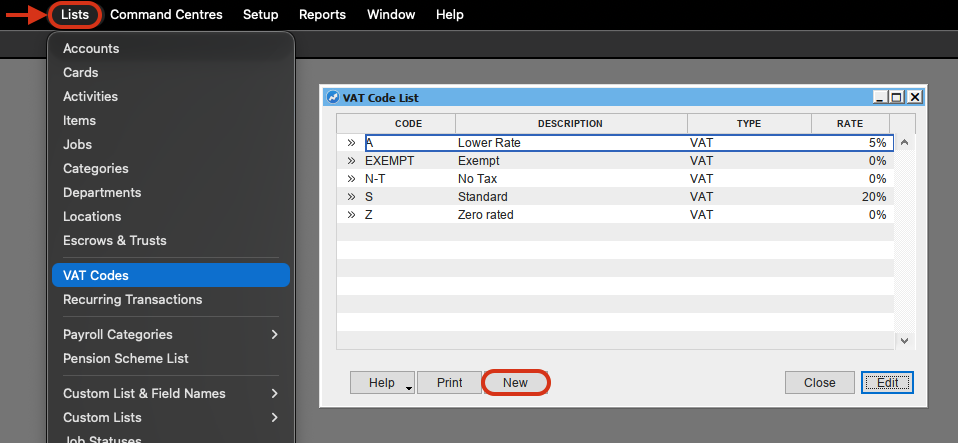
• In AccountEdge, at the top of your screen select Lists> VAT Codes.
• The VAT Code List will appear. Click New.
• Enter a VAT Code reference, for example 'REV-EU/ROW' or similar.
• Enter a Description such as 'Reverse Charge EU/RoW Service Purchase' or similar.
• Set the VAT Type to 'Reverse Charge EU/RoW Service Purchase'.
• Set the Reported Rate on VAT Return to the current standard rate.
• Set the Linked Account for VAT Collected and VAT Paid to your VAT Due liability account (2-xxxx).
• Linked Card for VAT Authority is not a mandatory field.
Example:
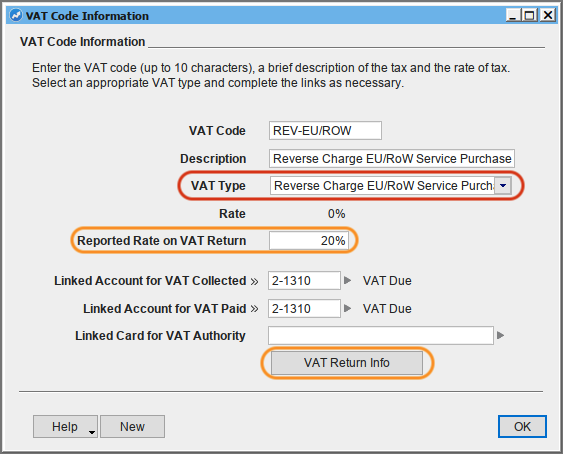
• Click the VAT Return Info button.
• Check that the VAT Code is available for Purchases (Inputs), and affects boxes 1, 4, 6, and 7.
When recording transactions requiring Reverse Charge EU/RoW service purchase treatment, simply use your new VAT Code on the relevant lines of the transaction.