
Article ID: 2027030 Last updated: 7 April 2026
AccountEdge v34 introduced a new Sales and Purchase preference:
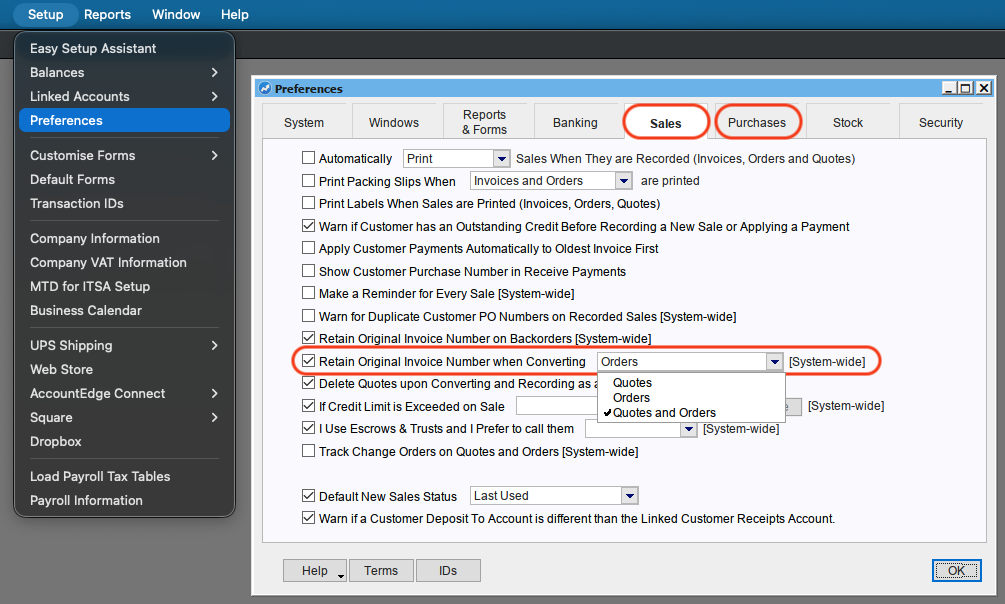
The new preference determines what happens to invoice numbers when converting Quotes and/or Orders to Invoices.
Customers should check their preference setting to ensure their invoice number sequence continues in their preferred manner.
• If you use more than one company file, check the setting in each file.
If you are not using custom transaction numbers to track Orders and or Quotes separately from your Invoice and Credit Memo transaction types, we recommend the following setup:
• Tick and select Orders if you wish for Orders (only) to retain their original number when converted to Invoice.
• Tick and select Quotes and Orders if you wish for Quotes and Orders to retain their original number when converted to Invoice.
• Untick the preference if you do not want Quotes or Orders to retain their original number when converted to Invoice.
This will result in the original Quote / Order being deleted and a new number being assigned to the converted Invoice.
Note that unless you are using custom invoice numbers, this may cause gaps in your Invoice number sequence, since converted Quotes and Orders will not be retained.